¶ ElevenLabs Speech-to-Speech Integration
The Agent Voice Response (AVR) platform supports integration with ElevenLabs Speech-to-Speech (STS), enabling high-quality, real-time conversational AI. ElevenLabs is well known for its natural and expressive voices, making it an excellent choice for creating human-like conversational agents.
¶ Why Use ElevenLabs STS?
- Natural, Human-like Voices — Industry-leading voice quality.
- Real-time Streaming — Low-latency audio generation for fluid conversations.
- Flexible Integration — Seamless integration with AVR Core via AudioSocket.
- Private Agents Support — Use public or private/custom ElevenLabs agents.
- Tool (Function Call) Support — Native support for AVR tools and custom actions.
¶ Configuration
¶ Environment Variables
| Variable | Description | Example Value |
|---|---|---|
PORT |
Port on which the ElevenLabs STS service runs | 6035 |
ELEVENLABS_AGENT_ID |
Static ElevenLabs Agent ID | your_agent_id |
ELEVENLABS_AGENT_URL |
HTTP endpoint returning the agent ID dynamically | https://your-api.com/agent |
ELEVENLABS_API_KEY |
API key (only required for private agents) | sk-xxxx |
⚠️ If
ELEVENLABS_AGENT_URLis set, it overridesELEVENLABS_AGENT_ID.
¶ Dynamic Agent Loading
When ELEVENLABS_AGENT_URL is configured, AVR will dynamically resolve the agent to use per call.
- AVR performs an HTTP GET request
- Header included:
X-AVR-UUID: <session-uuid> - Expected response:
{
  "system": "your_elevenlabs_agent_id"
}
This enables per-session routing, personalization, and advanced business logic.
¶ Example: Dynamic Agent Loader Web Service (Node.js)
When using ELEVENLABS_AGENT_URL, AVR expects an HTTP endpoint that returns the ElevenLabs Agent ID to use for the current session.
This section shows a minimal Node.js + Express example that you can use as a starting point.
¶ How It Works
- AVR performs an HTTP GET request to the configured
ELEVENLABS_AGENT_URL - The request includes the session identifier in the header:
X-AVR-UUID:
- The web service must respond with a JSON object containing a
systemfield set to the ElevenLabs Agent ID
¶ Minimal Node.js Example
const express = require('express');

const app = express();
const port = process.env.PORT || 3000;

app.get('/agent', (req, res) => {
// You can access the AVR session UUID here if needed
const avrUuid = req.headers['x-avr-uuid'];

// Example: return a static agent ID
res.json({
    system: 'agent_'
  });
});

app.listen(port, () => {
    console.log(`Agent resolver listening on port ${port}`);
});
¶ Configuration in AVR
Point AVR to your service using the environment variable:
ELEVENLABS_AGENT_URL=http://your-agent-service:3000/agent
When this variable is set, AVR will ignore ELEVENLABS_AGENT_ID and resolve the agent dynamically for each call.
¶ Advanced Use Cases
This approach enables powerful scenarios such as:
- Selecting different agents based on:
- Caller number
- Time of day
- Language
- Campaign or queue
- Multi-tenant setups
- A/B testing voice agents
- Personalized customer experiences
You can implement any business logic you want before returning the agent ID.
¶ ⚠️ Important Audio Configuration (Required)
Before using this integration, configure your ElevenLabs Agent with the correct audio settings.
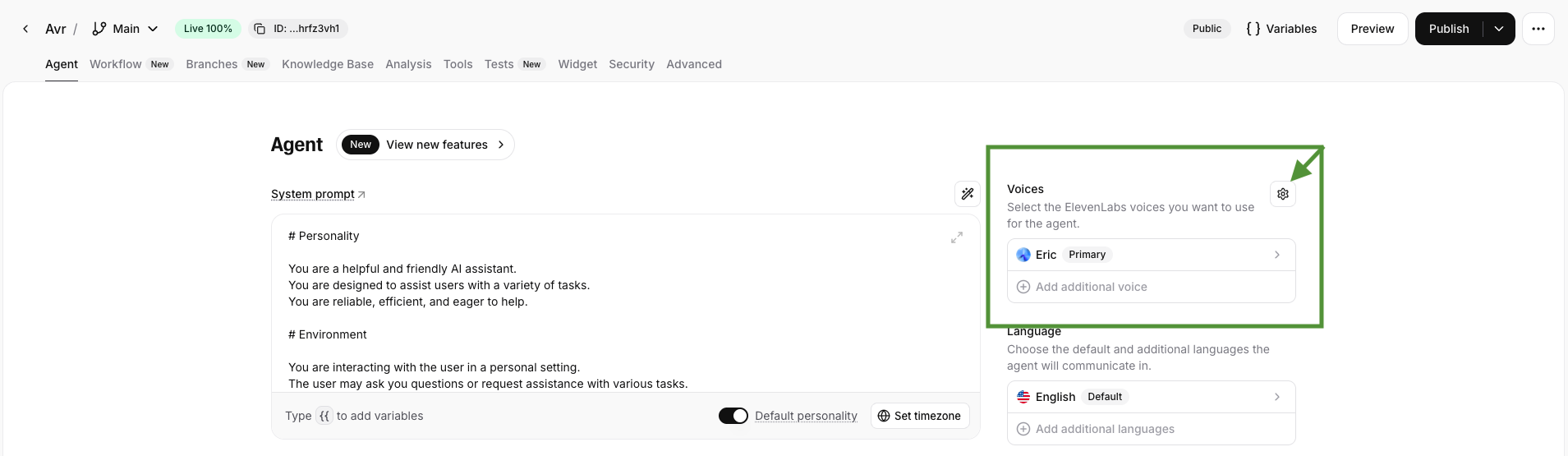
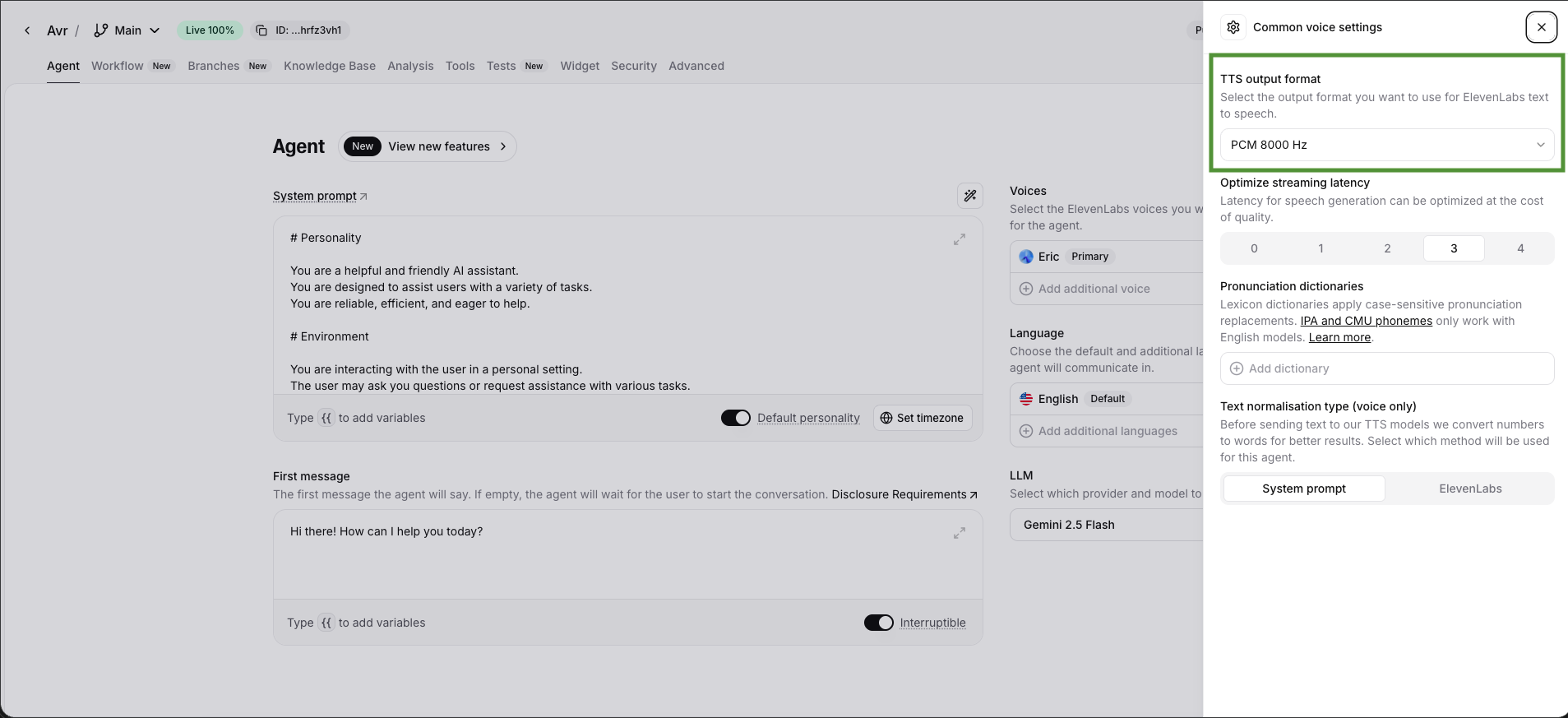
¶ TTS Output Format
- Go to Agent → Voice Settings
- Set TTS Output Format to PCM 8000 Hz
¶ User Input Audio Format
- Go to Advanced
- Set User Input Audio Format to PCM 8000 Hz

These settings are mandatory for proper compatibility with AVR.
¶ Tools (Function Calls)
ElevenLabs STS supports AVR tools, enabling the AI to trigger telephony actions.
¶ Default Tools
avr_transfer— Transfers the call to another extension.avr_hangup— Gracefully ends the call.
Custom tools are also supported.
📘 See full documentation:
https://wiki.agentvoiceresponse.com/en/avr-function-calls
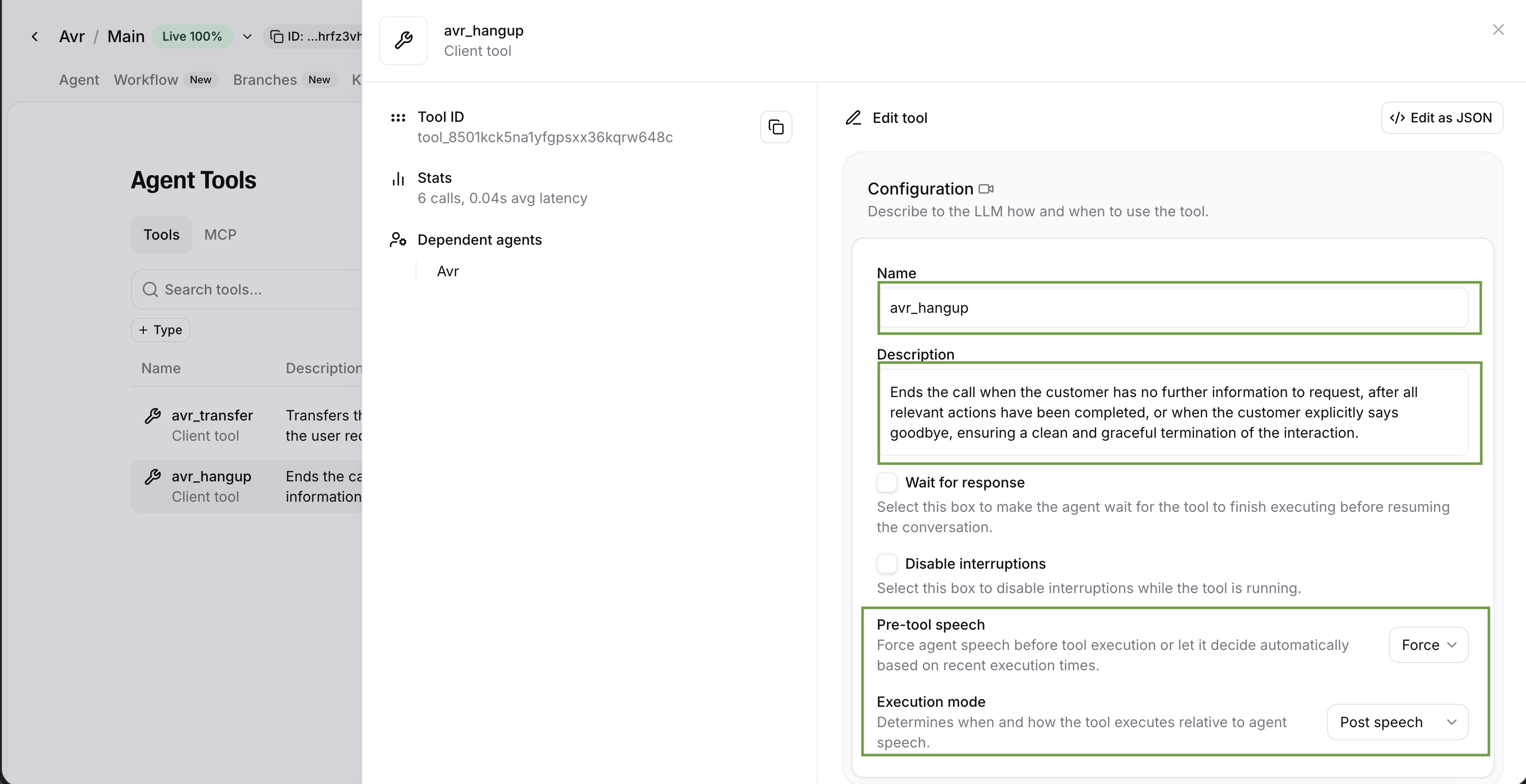
¶ Declaring Tools in ElevenLabs UI
Unlike OpenAI or Gemini, tools must be explicitly declared in the ElevenLabs web interface.
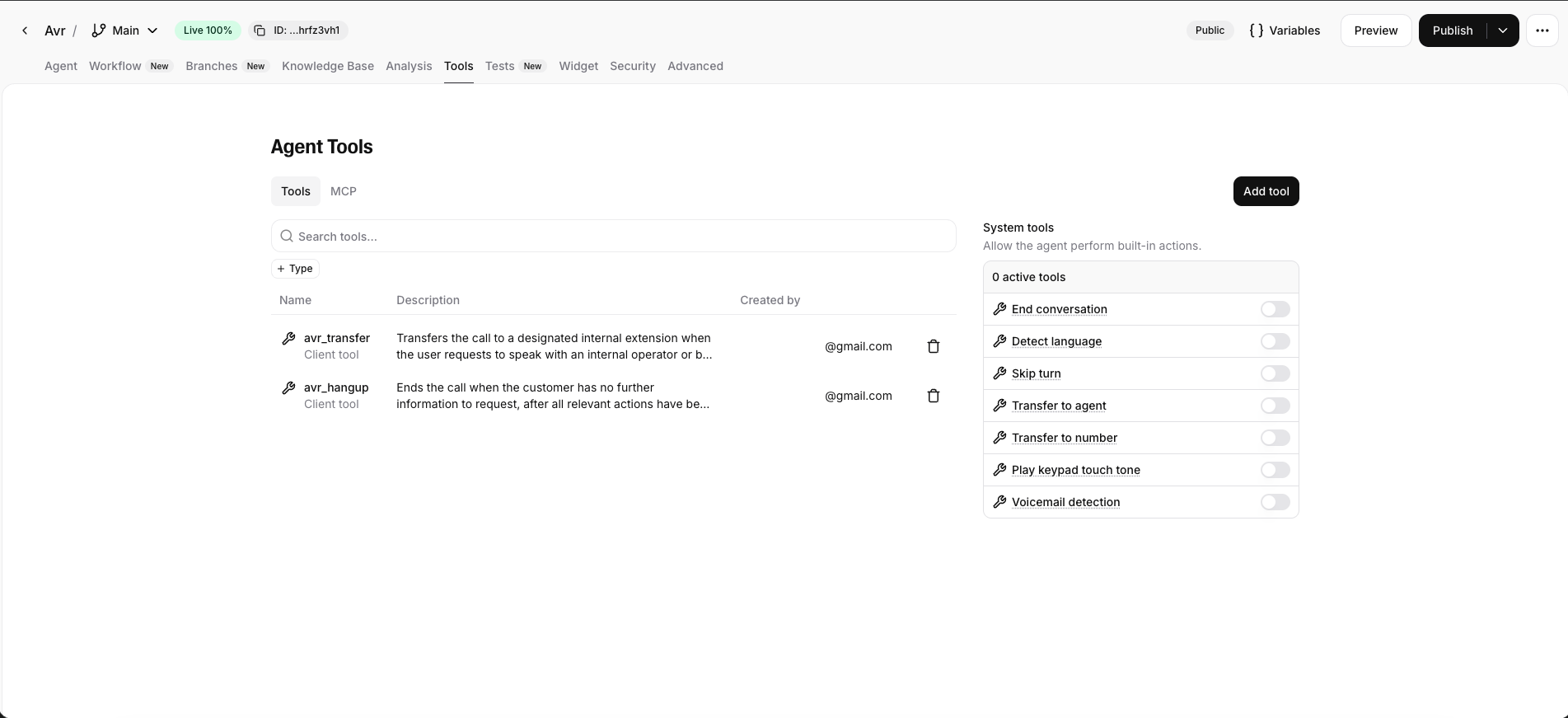
¶ Adding a Tool
- Open your ElevenLabs agent
- Go to Tools
- Click Add Tool
Repeat this process for default and custom tools.
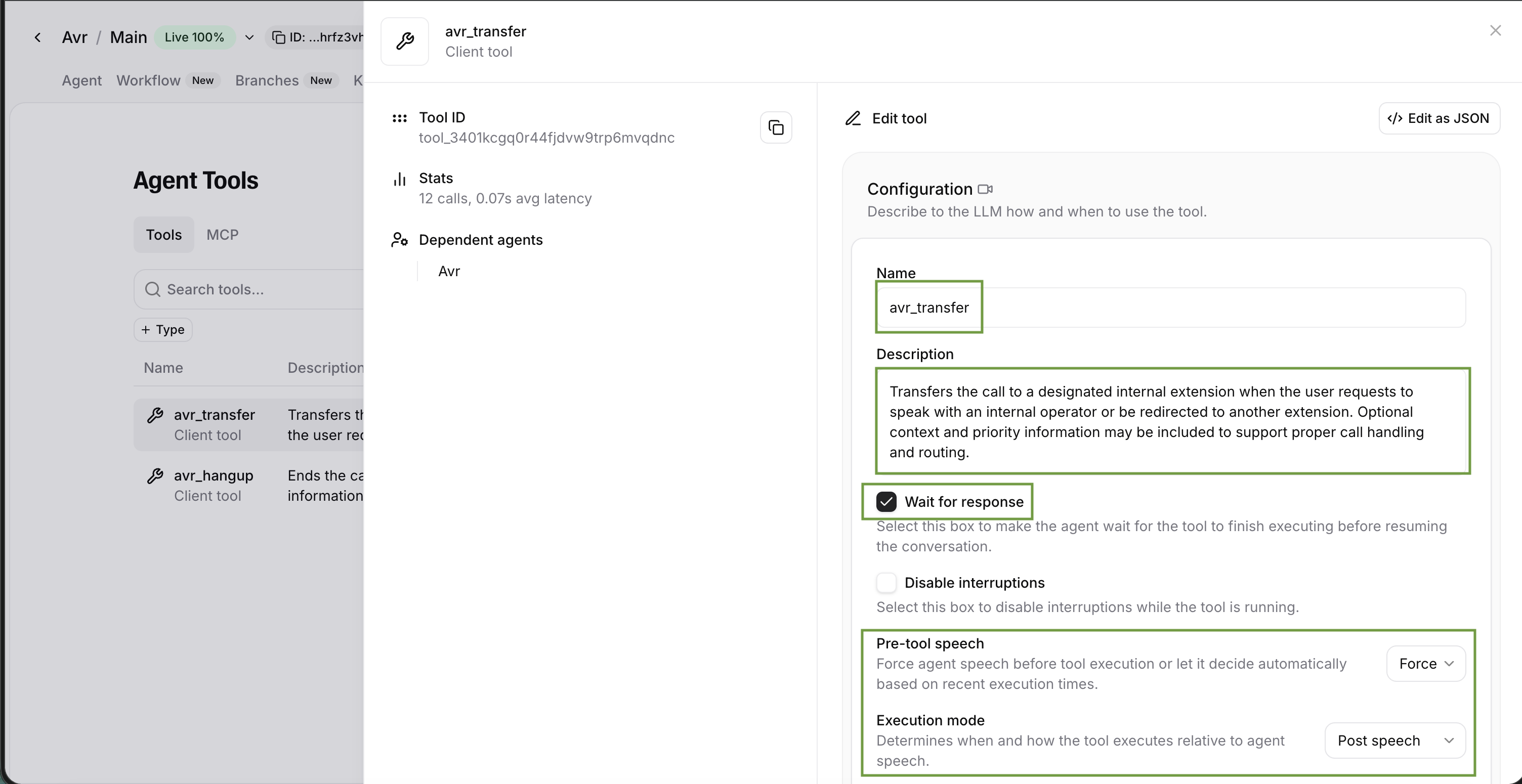
¶ Configuring avr_transfer
- Name:
avr_transfer - Description:
Transfers the call to a designated internal extension when the user requests to speak with an internal operator or be redirected to another extension. - Wait for response: Enabled
- Execution mode: Post Speech
¶ Configuring avr_hangup
- Name:
avr_hangup - Description:
Ends the call when the customer explicitly says goodbye or no further action is required. - Wait for response: Not required
- Execution mode: Post Speech (recommended)
¶ Docker Compose Example
avr-sts-elevenlabs:
  image: agentvoiceresponse/avr-sts-elevenlabs
  platform: linux/x86_64
  container_name: avr-sts-elevenlabs
  restart: always
  environment:
    - PORT=6035
    - ELEVENLABS_API_KEY=$ELEVENLABS_API_KEY
    - ELEVENLABS_AGENT_ID=$ELEVENLABS_AGENT_ID
    # - ELEVENLABS_AGENT_URL=$ELEVENLABS_AGENT_URL
    - AMI_URL=${AMI_URL:-http://avr-ami:6006}
  # volumes: # uncomment if you want to use the custom tools
  #   - ./tools:/usr/src/app/tools
  networks:
    - avr

avr-core:
  image: agentvoiceresponse/avr-core
  platform: linux/x86_64
  container_name: avr-core
  restart: always
  environment:
    - PORT=5001
    - STS_URL=ws://avr-sts-elevenlabs:6035
  ports:
    - 5001:5001
  networks:
    - avr
¶ References
- GitHub Repository: https://github.com/agentvoiceresponse/avr-sts-elevenlabs
- AVR Infra Example: https://github.com/agentvoiceresponse/avr-infra/blob/main/docker-compose-elevenlabs.yml
- Function Calls Documentation: https://wiki.agentvoiceresponse.com/en/avr-function-calls