¶ How AVR Works
The AVR Infrastructure project provides a complete, modular deployment environment for the Agent Voice Response (AVR) system.
It allows you to deploy AVR Core, ASR (Automatic Speech Recognition), LLM (Large Language Model), TTS (Text-to-Speech), or a unified STS (Speech-to-Speech) service, all integrated with Asterisk PBX using the AudioSocket protocol.
AVR supports a wide range of providers, including cloud services such as OpenAI, Deepgram, Google, ElevenLabs, Anthropic, as well as local and open-source providers like Vosk, Kokoro, CoquiTTS, and Ollama.
The entire stack can be customized and deployed using Docker Compose.
¶ Prerequisites
Before starting, ensure the following tools and credentials are available:
- Docker and Docker Compose
- API keys for cloud providers you plan to use
- (Optional) SIP client for testing (e.g. Telephone, MicroSIP, GNOME Calls)
- (Optional) Local ASR / TTS / LLM services if using open-source providers
¶ High-Level Architecture
AVR follows a modular and provider-agnostic architecture.
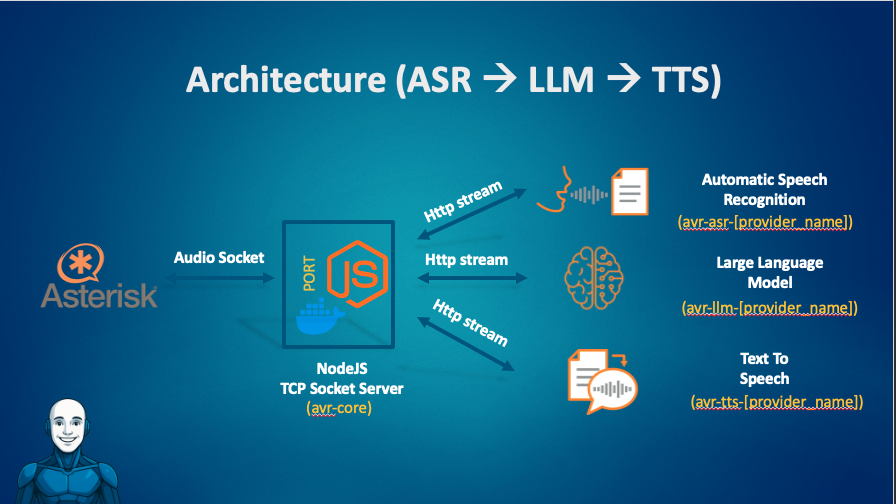
At runtime, AVR Core acts as the orchestrator between Asterisk and the configured AI services.
¶ Call Lifecycle Overview
At a high level, a call handled by AVR follows this lifecycle:
- Call metadata is initialized (HTTP)
- Audio streaming starts (AudioSocket)
- Speech is processed (ASR → LLM → TTS or STS)
- Audio is streamed back to the caller
- Call terminates and resources are released
The sections below describe each step in detail.
¶ 0) Call Initialization (Asterisk → AVR Core HTTP)
Before audio streaming begins, the call can be explicitly initialized via HTTP.
This step is optional but strongly recommended, as it enables:
- call metadata propagation
- webhook-based routing
- dynamic STS selection
¶ Flow
-
The Asterisk dialplan:
- generates a UUID
- sends a
POST /callrequest to AVR Core - includes call metadata (caller, extension, uniqueid, channel, etc.)
-
AVR Core:
- stores the metadata
- emits the
call_initiatedwebhook - optionally allows a webhook to override the STS URL
See also:
- AVR Core HTTP Web Service
- Webhook Integration Guide
¶ Call Lifecycle (HTTP, AudioSocket, Webhooks)
¶ 1) Audio Ingestion (Asterisk → AVR Core AudioSocket)
Once the call is initialized, Asterisk opens a TCP AudioSocket connection to AVR Core.
From the dialplan:
- the same
UUIDused inPOST /callis passed to AudioSocket - Asterisk streams real-time audio frames to AVR Core
AVR Core responsibilities:
- accept the AudioSocket connection
- normalize audio format if needed
- segment audio into streaming chunks
¶ 2) Transcription (AVR Core → ASR)
When using the classic pipeline:
-
AVR Core streams audio chunks to the ASR service (
ASR_URL) -
The ASR returns:
- partial transcripts (interim)
- final transcripts (utterance completed)
-
AVR Core:
- buffers partials
- emits a final transcript when stabilized
The final transcript triggers the reasoning step.
¶ 3) Reasoning and Response (AVR Core → LLM)
-
AVR Core sends the final transcript and conversation context to the LLM (
LLM_URL) -
The LLM generates the assistant response:
- streaming tokens, or
- a complete text response
AVR Core handles provider-specific streaming and normalization.
¶ 4) Voice Rendering (AVR Core → TTS)
- The LLM response text is sent to the TTS service (
TTS_URL) - TTS produces audio frames
- AVR Core streams the audio back to Asterisk over the existing AudioSocket
The caller hears the response with minimal latency.
¶ Alternative Path: Speech-to-Speech (STS)
If STS_URL is configured, AVR Core bypasses ASR, LLM, and TTS entirely.
Caller speech is sent directly to the STS provider, which returns synthesized speech.
This approach:
- reduces latency
- simplifies the pipeline
- is ideal for real-time conversational agents

STS routing can be static or dynamic via the call_initiated webhook.
¶ What the Caller Experiences
From the caller’s perspective:
- They speak naturally
- AVR processes speech in real time
- Responses are generated and spoken back
- Interruptions and DTMF are handled seamlessly
- The interaction feels conversational and responsive
¶ Your First Agent in Under 5 Minutes
Use one of the preconfigured Docker Compose files to launch AVR with your preferred providers.
¶ Steps
git clone https://github.com/agentvoiceresponse/avr-infra
cd avr-infra
cp .env.example .env
Run a stack, for example:
docker-compose -f docker-compose-openai.yml up -d
Or with local providers:
docker-compose -f docker-compose-local.yml up -d
Edit .env with your provider credentials.
¶ Configuration Summary (AVR Core)
¶ Classic Pipeline
ASR_URLLLM_URLTTS_URL
¶ STS Pipeline
STS_URL(ASR / LLM / TTS disabled)
ASR_URL=http://avr-asr-deepgram:6010/speech-to-text-stream
LLM_URL=http://avr-llm-anthropic:6000/prompt-stream
TTS_URL=http://avr-tts-google:6003/text-to-speech-stream
STS_URL=http://avr-sts-openai:6033/speech-to-speech-stream
Hostnames and ports depend on your Docker Compose configuration.