¶ Integrating VitalPBX with AVR

Integrating VitalPBX with Agent Voice Response (AVR) allows you to route calls directly to the AI voicebot as if it were a standard extension.
This setup is very similar to FreePBX but uses VitalPBX’s custom dialplan files.
¶ What is VitalPBX?
VitalPBX is an Asterisk-based PBX distribution that provides a web interface to manage extensions, trunks, and call routing.
Although most configurations are done through the web UI, advanced integrations like AVR require adding custom Asterisk dialplan logic.
Asterisk’s dialplan is the logic that defines how calls are processed.
By creating a small dialplan snippet, we can forward calls from VitalPBX into the AudioSocket channel used by AVR.
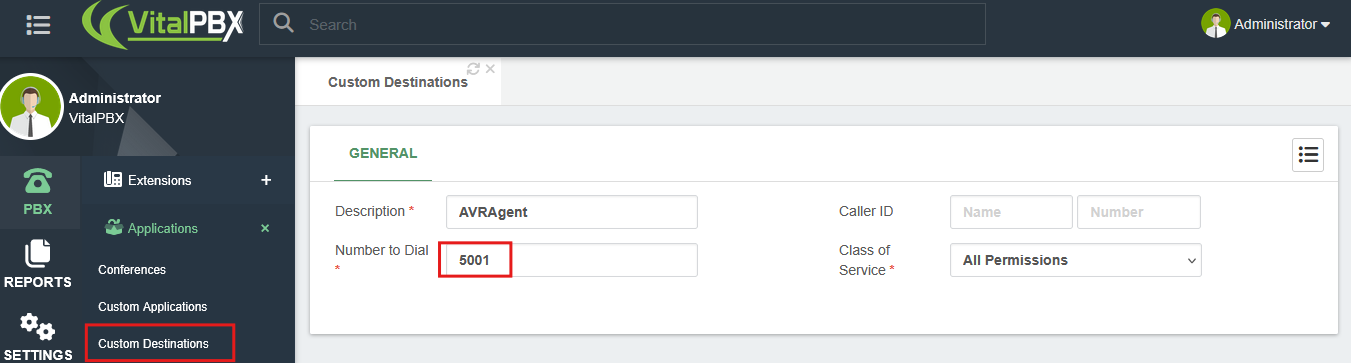
¶ Step 1: Add a Custom Destination in VitalPBX
- Log into your VitalPBX Admin UI.
- Go to PBX → Applications → Custom Applications.
- Click Add Custom Application.
- Define your custom application with:
- Description:
AVRAgent - Number to Dial:
5001(or any free number you want to use for AVR)
- Description:
This tells VitalPBX that when someone dials 5001, it should look into the custom dialplan we’re going to create.
¶ Step 2: Create the AVR Dialplan File
On your VitalPBX server, you’ll need to manually add an Asterisk configuration file.
-
Connect via SSH to your VitalPBX server.
-
Create a new file at:
/etc/asterisk/vitalpbx/extensions__90-avr.conf -
Add the following configuration (replace 127.0.0.1 with your avr-core IP address):
[cos-all-custom](+)
exten => 5001,1,Answer()
exten => 5001,n,Ringing()
exten => 5001,n,Set(UUID=${SHELL(uuidgen | tr -d '\n')})
exten => 5001,n,AudioSocket(${UUID},127.0.0.1:5001)
exten => 5001,n,Hangup()
Explanation
- Answer() → Answers the incoming call.
- Ringing() → Plays a ringing tone before AVR picks up.
- Set(UUID=...) → Generates a unique session ID for the call.
- AudioSocket(...) → Connects the call audio stream to AVR Core using AudioSocket.
- Hangup() → Ends the call once AVR finishes.
¶ Step 3: Reload the Dialplan
After saving the file, apply the changes by reloading Asterisk:
asterisk -rx "dialplan reload"
If you’re not familiar with Asterisk CLI, you can enter it by running:
asterisk -rvvv
From there, you can debug calls in real-time as they are processed.
¶ Step 4: Test the Integration
- Register a SIP softphone or deskphone with your VitalPBX server.
• Example: Use Telephone for macOS or MicroSIP for Windows. - Dial the custom extension (e.g., 5001).
- AVR should answer. If you configured an echo test first, you should hear your own voice.
- If AVR is linked to an LLM, you’ll be able to talk directly with your AI voicebot.
¶ Troubleshooting
- Run asterisk -rvvv and call the extension → watch the logs to ensure the AudioSocket connection is established.
- Check firewall rules → Ensure the VitalPBX server can reach the avr-core container (port 5001 by default).
- If the call hangs up immediately → Verify that the IP in AudioSocket() points to your AVR Core container and not localhost (unless AVR is on the same machine).
You have now successfully integrated VitalPBX with Agent Voice Response!
Your PBX can now forward calls directly into AVR for AI-powered interactions.